

Which IPTV provider in Canada is the right one for your household? Most comparison pages answer a different question. They sort services by channel totals and monthly price, which are the two things you can't check before you pay, and the two that matter least once a stream starts stalling at eight in the evening.
I judge a provider on what I can verify in an afternoon. Who is legally behind the site. Whether your line carries the number of simultaneous streams you need. How playback holds up when the whole neighbourhood is watching. What the refund terms say in writing. Channel counts are marketing copy. Everything else is engineering or contract law, and both are testable before money moves.
Here's the order to run those tests in, so you compare services on evidence instead of promises.
Table of Contents
- Eight Checks Every IPTV Provider in Canada Should Pass
- How IPTV Subscriptions Work in Canada
- Bandwidth and Device Limits to Plan For
- Why Playback Stability Depends on More Than Speed
- Rural, Northern and Apartment Connections to Test
- How to Set Up an IPTV Subscription Step by Step
- Channel Languages and Sports Coverage to Verify
- Billing, Trial and Refund Terms to Confirm
- Test a Free Trial Before You Commit
Eight Checks Every IPTV Provider in Canada Should Pass
An IPTV provider in Canada should pass eight checks before you pay, and a failure on legal identity or billing terms is a reason to walk away no matter how good the channel list looks.
| Check | What to Confirm | Red Flag | How to Test |
|---|---|---|---|
| Legal business identity | A named company, business details and a working contact page | No company name or contact details | Find the terms page and a support address before paying |
| Content rights | The provider explains what it carries and under what rights | Channel counts with no explanation of content sources | Ask in writing which channel categories are included |
| Province availability | Canadian channels, regional news and sports networks reach your location | Channels advertised with no regional detail | Check the lineup for your province during the trial |
| Device compatibility | Your TV, box, phone or laptop appears on the supported list | No device list and no setup guide | Match your device to the list and install the player |
| Bandwidth headroom | Plan speed covers the total of your simultaneous streams | Plan speed close to the total with no margin | Calculate your streams and run a peak-time test |
| Trial access | Trial length, card requirement and included channels | Trial terms missing or unclear | Start the trial and note the stated end time |
| Billing and refund terms | Refund window, renewal rules and contract status | Refund terms that appear nowhere in writing | Save a copy of the terms before paying |
| Support hours and channels | Response channels and hours are published | Support reachable only through one unverified contact | Send a test question and time the reply |
Legal business identity carries the most weight, because every other protection depends on there being a company to hold to its word. If the payment page shows a trade name and nothing else, you have no counterparty. Our guide to safe, legal IPTV streaming in Canada covers how licensing and consumer protections apply to internet-delivered television, which is worth reading before you evaluate any provider.
Content rights means the provider explains what it carries and under what rights, not just that it carries 20,000 channels. Province availability exposes gaps that a national listing hides: a channel that exists on the master list but never reaches your region is useless to you. Device compatibility is easy to confirm if the provider publishes a supported device list and a setup guide.
Bandwidth headroom and trial access are the two checks people skip. Both are free, and both are where a cheap plan reveals itself.
Scoring providers out of eight
Score each provider out of eight and keep the scores on paper or in a note, because after three services the details blur. Compare providers on the same eight checks, never on channel counts. A provider that scores seven and answers support in ten minutes is a better bet than one that scores five with 40,000 channels and no refund policy.
How IPTV Subscriptions Work in Canada
An IPTV subscription delivers live television over Internet Protocol networks and plays it through an app on a device you already own. The label covers more than one kind of service, so the definition matters.
IPTV means television delivered through Internet Protocol networks.
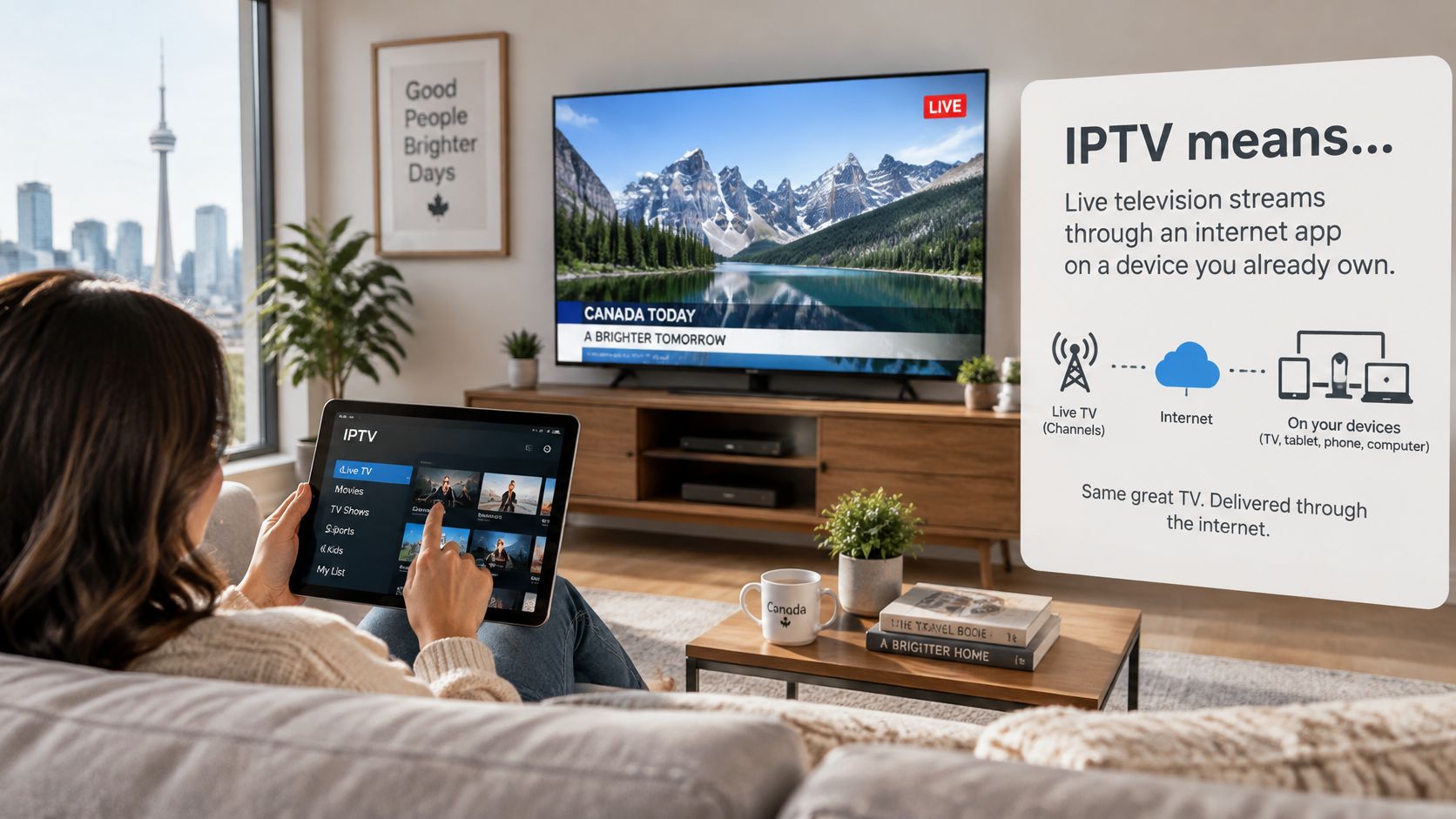
The regulator applies that term to regulated subscription television on a provider's managed network, and it names Bell Fibe and TELUS Optik TV as examples. It places internet-based video services such as Netflix, Crave and Club Illico in a separate category entirely. That split isn't academic: CRTC broadcasting distribution data shows IPTV rising from 20% of Canadian broadcasting-distribution subscribers in 2019 to 35% in 2023, a 15-percentage-point climb, while direct-to-home satellite subscribers fell 13.41% from the 2022 broadcast year. Regulated IPTV held its ground; satellite didn't.
Commercial IPTV sold to Canadian buyers usually means an internet-delivered channel package rather than a managed-network subscription, so the same three-letter label can describe very different products. ROVE Canada describes its service as an internet-based alternative to traditional cable that doesn't depend on cable connections, and that description is the company's own, so check whether it fits your home and devices before you rely on it.
The three parts of any subscription
Every IPTV purchase, whatever the provider, breaks into three components.
- The channel package you choose. This sets the content categories and how many simultaneous connections you get.
- The login credentials sent after purchase. These are your account, and they're usually a username, password and sometimes a server address.
- The player app that loads the channels. This runs on your device and turns the credentials into a watchable lineup.
Think of it as a magazine delivered by a courier you didn't choose. The magazine's contents are the channel package; the courier is the delivery network. A great magazine on an unreliable courier arrives late, torn, or not at all. Delivery quality decides whether the channels are usable, not the size of the package.
Bandwidth and Device Limits to Plan For
| Stream quality | Per stream (CRTC minimum) | Two simultaneous streams | Four simultaneous streams |
|---|---|---|---|
| Standard definition (SD) | 3-5 Mbps | 6-10 Mbps | 12-20 Mbps |
| HD | 5-8 Mbps | 10-16 Mbps | 20-32 Mbps |
| 4K UHD | 25 Mbps | 50 Mbps | 100 Mbps |
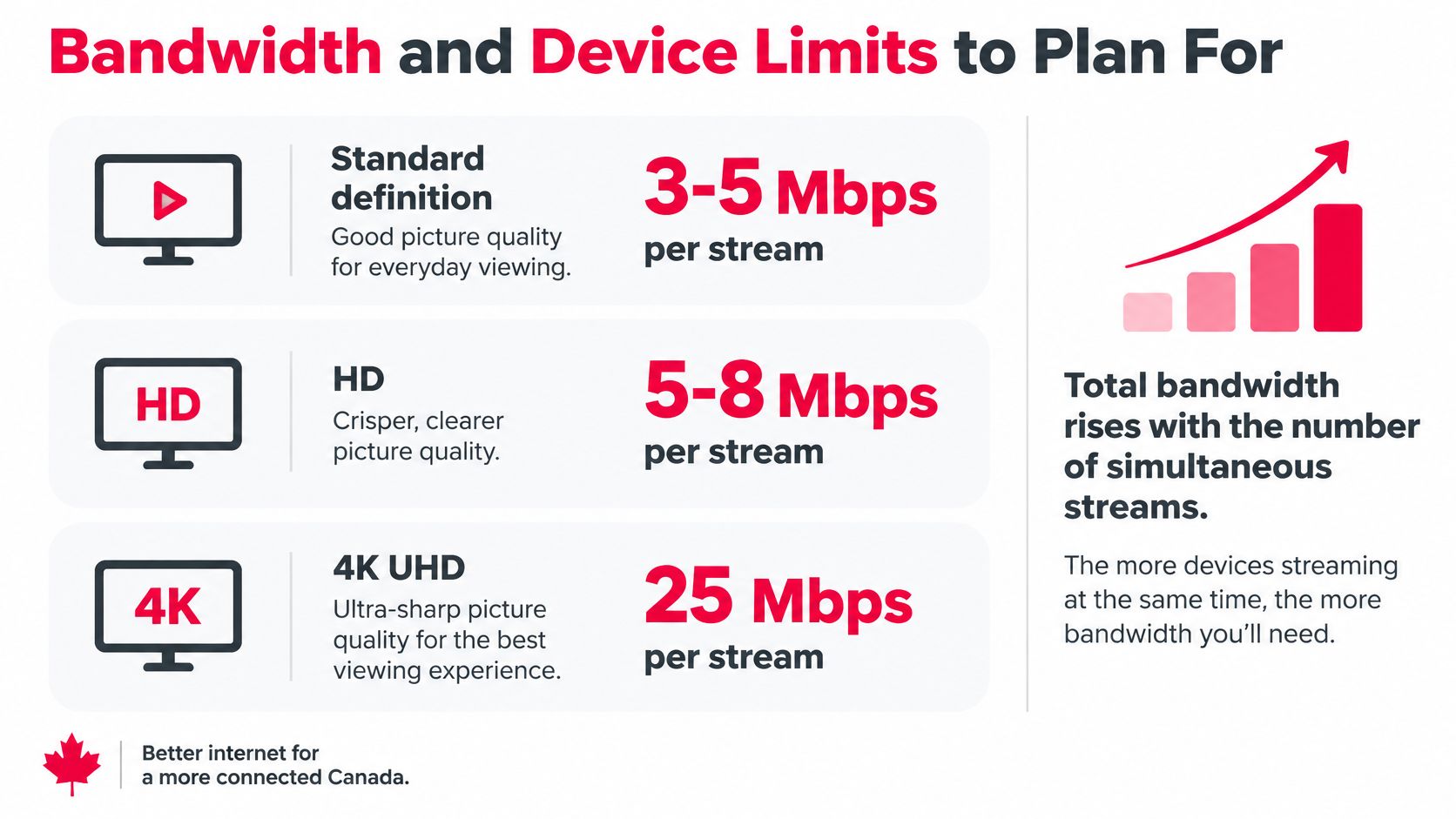
Those columns are arithmetic, not opinion. The CRTC's streaming bandwidth figures give roughly 3 to 5 Mbps for standard definition, 5 to 8 Mbps for HD, and 25 Mbps for 4K UHD, and each number applies to one stream. Multiply by the number of screens running at once and you have your floor, before software updates, gaming, cloud backups, Wi-Fi overhead and normal bitrate variation take their share of the same pipe.
Worked example for a three-screen household
Picture two 4K televisions, one in the living room and one in the bedroom, plus an HD tablet in the kitchen. That's 25 Mbps plus 25 Mbps plus 5 to 8 Mbps, or roughly 55 to 58 Mbps of sustained downstream capacity. On a 60 Mbps line, that household is already at the ceiling before anyone opens a laptop, and evening congestion will find the gap.
A five-connection subscription doesn't mean five 4K streams will run cleanly on any line. It means the account allows five, and whether your internet keeps up is a separate question.
Wiring and headroom
Run fixed televisions on wired Ethernet where you can. It removes Wi-Fi from the equation entirely for the devices that never move. For phones, tablets and anything else on wireless, use a strong 5 GHz or 6 GHz connection and keep the access point in the same room as the screen if the signal is marginal.
Reserve a margin above your calculated stream total rather than buying a line that matches it exactly. Adaptive bitrate delivery will lower resolution to keep the picture moving when bandwidth drops, which protects continuity but costs you the picture quality you paid for. It doesn't create capacity.
Data allowances matter too. The same CRTC figures note that 4K streaming can consume as much as 5 GB per hour, so a capped or mobile-based plan needs that arithmetic run before a long weekend of sport.
The four-step calculation
- Count your peak viewers. Not the people in the house, the screens streaming at the same time.
- Assign each one a quality. Be honest about whether the bedroom TV really needs 4K.
- Total the streams. Use the per-stream minimums above.
- Add headroom, then compare with your plan speed. If the total is within 20% of your measured speed, you're planning a problem.
Confirm the simultaneous-connection limit on the plan page before you count, and read our breakdown of IPTV internet speed requirements if you want the per-device numbers laid out. Multiple simultaneous connections let everyone in a household watch on different devices at the same time, which is exactly why the total, not the average, is the number that matters.
Why Playback Stability Depends on More Than Speed
Speed alone doesn't predict a smooth picture. The CRTC's research on streaming quality factors identifies network congestion, server load, latency, packet delivery conditions, device capability and bandwidth shared among household devices as variables that affect playback. I use 35 to 42 ms as the upper limit of acceptable latency for live video. Above that range, channel changes feel sluggish and streams take longer to start.
The chain runs in one direction. Too little sustained throughput forces a lower bitrate or a rebuffer. Congestion and server load raise packet delay and loss. Weak in-home Wi-Fi undermines a fibre or cable line that tested perfectly well at the street.
The provider states that it runs its own servers, hosted locally, on optic-fiber high-speed internet. Verify that claim during the trial. Apply the same scrutiny to any provider's promises about local hosting, load distribution or HD and Full HD playback, because a trial window is the only place those claims get tested against your connection, your router and your evening peak.
A peak-time test you can run tonight
- Run one stream on wired Ethernet at an ordinary hour and note the resolution and startup time.
- Repeat at evening peak with the household's other devices active: phones on Wi-Fi, a laptop, a game console if you have one.
- Record four things: resolution stability, startup delay, rebuffer events and latency.
- Repeat the same test on Wi-Fi from the room where you'll watch.
- Send support a question during the same window and note how long the reply takes.
Decision rule: If wired playback is stable and Wi-Fi isn't, fix your home network. If both fail at peak, send the timestamps and device details to support and ask how peak demand is handled.
That second case tells you something the marketing page can't. A provider that answers with specifics about capacity and routing is worth continuing with. One that replies "restart your router" and stops there has shown you what support will look like for the length of your subscription.
Rural, Northern and Apartment Connections to Test
A home that clears the national broadband average can still fail the peak test, so test the line you have. The CRTC broadband access figures put fixed broadband access at 96.1% of Canadian households in 2024-25, which describes coverage, not how any single line performs at eight in the evening.
Apartment and condo buildings raise a question most buyers skip: does the building share a network or a common Wi-Fi access point? Neighbours streaming in the same tower draw on the same shared headroom, and nothing on your plan page says so. Ask the property manager, and ask your ISP whether your connection is a dedicated drop or a shared riser feeding multiple units.
Fixed wireless, satellite and mobile-plan households face a different check. A plan can clear the speed total on paper and still hit a monthly data cap or throttle in the evening. Run the arithmetic before you buy: your expected nightly streaming hours against the monthly allowance. If the plan charges overage fees, note the rate per extra gigabyte, because one heavy sports weekend changes the bill.
Northern and rural lines add two more variables. Fixed wireless depends on a clean path to the tower, so trees, weather and distance all show up in playback before they show up in a noon speed test. Satellite adds latency that the headline speed number hides, which matters for live sports and channel changes.
Record latency alongside speed at every test slot. Then put any restriction tied to your region or connection type to the provider in writing before your trial window closes, and keep the reply with your notes.
How to Set Up an IPTV Subscription Step by Step
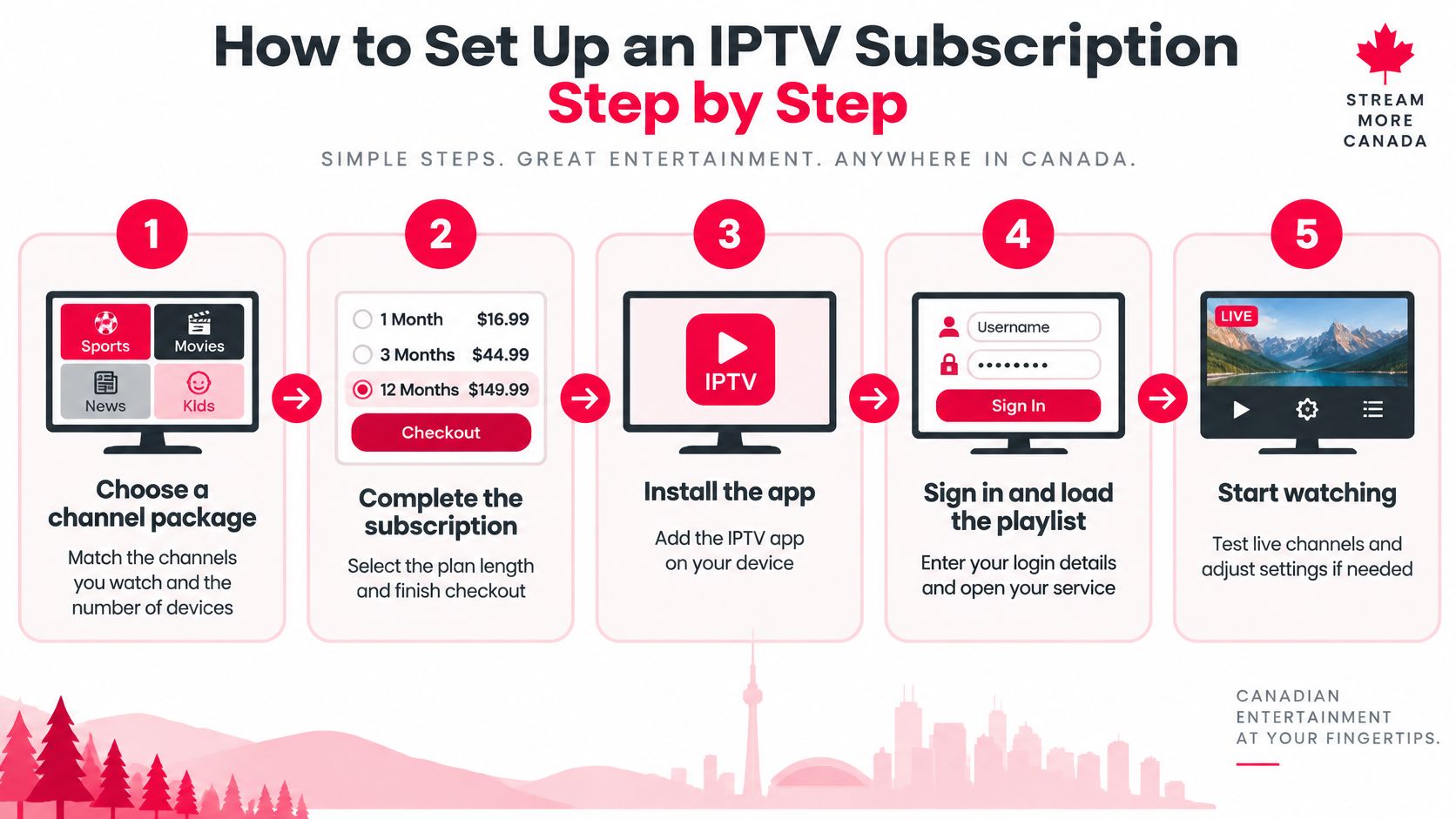
The standard setup runs in five steps, and each one has a failure mode worth knowing before you start. A step-by-step IPTV installation guide for Canada covers the device-specific detail; the sequence below is what a buyer should expect from any self-serve subscription, and it should be manageable without technical experience.
- Choose a channel package that matches the channels you watch and the number of devices you need. The mistake here is buying connections you won't use, or too few for a household that splits across rooms.
- Receive your login credentials after purchase and store them somewhere you'll find again. If nothing shows up within the stated delivery window, check your spam and promotions folders before opening a support ticket, because automated mail lands there regularly.
- Install an IPTV player app on a supported device. Smart TVs, Android TV boxes, Amazon Firestick devices, smartphones and tablets, Windows laptops and Mac computers all appear on the supported list, and the player is what turns credentials into channels.
- Enter the activation information in the player. This is the step that breaks most often, and it's almost always a mistyped character or a stray space pasted in with the password.
- Start streaming. Give the first channel a moment to load before you conclude anything about quality.
The step the instructions leave out
Add a sixth step of your own: test one channel from each category you care about and run a check during evening peak. Judge ease of setup yourself by repeating the process on a second device without help. If the second install needed a reread of the welcome email or a support reply, the onboarding has friction worth pricing into your decision.
The moment of truth comes at the end. The first channel loads quickly, the picture holds at the quality you selected, and the player keeps the activation after a full restart. If any of those three fails, note it before the trial ends.
Trial checklist: first channel loads clean, picture holds at your chosen quality, activation survives a restart, one evening peak test passed, one support reply timed.
Channel Languages and Sports Coverage to Verify
Work from named networks, not category labels. Start by listing the categories the provider publishes: Canadian entertainment and lifestyle programming, national and regional news, family channels, sports networks, and international categories spanning global entertainment, international sports, documentaries, music and educational content. Rove IPTV Canada publishes that category set, and it works well as a checklist. Match every network your household watches to the live lineup, then search for each one by name inside the player.
The language split matters more than any total. English and French Canadian viewers do not watch the same networks or spend time on the same platforms. Data cited in CBC and Radio-Canada's submission to the CRTC's market dynamics consultation puts anglophone digital-platform video time at about 40.5%, against roughly 24% for francophones, and finds that only 1.2% of anglophone and 3.3% of francophone digital-video time goes to Canadian platforms. A French-speaking household in Montreal should be checking named Quebec networks in French rather than scanning a global channel list.
Sports needs the same scrutiny. A provider can list a sports category and still carry no coverage of the tournament or league you follow. Labels describe what a provider claims to offer, and the trial lineup is the proof. Ask for the league, team or network by name, confirm it in your province's lineup, and watch one live event rather than trusting the schedule grid.
A five-part check to run during the trial
- Named networks you watch, written down before you subscribe.
- French-language options, if anyone in the household needs them.
- Sports events and leagues by name, confirmed against the live lineup.
- News for your region, including local coverage.
- The international categories you'll use, such as documentary or music channels.
Mark each item confirmed, missing or unclear, and pause on any service that leaves you with two or more unconfirmed items. Unclear is a legitimate outcome at trial stage. It stops being legitimate after you've paid.
Billing, Trial and Refund Terms to Confirm
Every term below is a question you put in writing and keep the answer to, because verbal assurances don't survive a dispute.
What exactly will the bill be, in what currency, and when does it renew? A monthly plan that renews on the 14th and charges in US dollars costs a Canadian household more than the sticker price suggests, so confirm the renewal date, the billing currency and whether tax is included before the first payment. Ask how your personal data is handled, where a complaint goes if playback fails for a week, and whether the refund clock starts at payment or at activation. That last point decides how much of the refund window you get to use.
The CRTC's material on consumer protections and streaming access notes that its consumer-protection codes aim to make service agreements understandable and help prevent bill shock, and that 78% of Canadians reported access to at least one video-streaming service in 2025 while only 52% reported cable television service. Those codes are framed around licensed broadcasting distributors, so ask any internet-delivered provider how its protections apply to your subscription.
Flexible subscription options, secure payment methods and a seven-day money-back guarantee are the kind of terms worth holding in writing rather than trusting from a sales page. Confirm the renewal setting and the exact refund conditions yourself before paying, and hold every provider to the same standard regardless of how the terms are packaged.
Three red flags to watch for
- Refund rules that appear nowhere in writing, only in a chat message you can't retrieve.
- A payment page with no address and no terms link.
- A provider that won't explain renewal, or answers the question with a discount offer.
Keep the documents you saved during the sign-up checks close at hand here. Written answers, a dated receipt and the terms page are what a disagreement gets argued from.
Test a Free Trial Before You Commit
Don't pay until the trial shows stable playback on the devices you'll use. Whatever a provider advertises, confirm the trial length, whether a credit card is required, and which channels are included, and get those answers in writing before the clock starts.
During the trial, run the peak-time test on your most-used devices, time one support reply, and verify that the specific channels you shortlisted are in the lineup. Those tests are the evaluation. Everything else is a website.

If the service passes all eight checks and holds steady at evening peak, compare plans on scope rather than price alone. The 12 Months IPTV Subscription Canada is the standard annual option, while the 12 Months IPTV Subscription Canada – 2 Devices covers the same term across two devices, which suits a household where two screens run at once. Read the device and player guide for Canadian setups before the trial starts so you're testing a configuration the service supports.
Let the trial result decide the purchase.
ROVE Canada offers internet-based IPTV subscriptions for Canadian households, combining live television channels and on-demand films with multi-device options and a free trial you can test on your own connection. If the eight checks in this article are the way you'd rather buy, run them against the service and see how it holds up at evening peak. Visit Rove IPTV Canada to compare subscription options and start a trial.

No Responses