
The free trial runs for 24 hours and, according to the publisher's trial page, requires no credit card to start. Use that time to evaluate three things: whether the service fits the devices you already own, whether your home connection supports the streams your household watches, and how playback performs at the hour you normally sit down.
So why do so many Canadian households finish a trial knowing no more than when they started? Because they test at the wrong time, on the wrong screen, with no definition of a pass. A laptop at two in the afternoon will make almost any service look flawless. The Saturday night game on the living room television is the honest examiner.
A trial is evidence collection, not a preview. What follows is the sequence a careful buyer runs: terms read before sign-up, devices listed before installation, an evening stress test with notes attached, and a decision built from those notes instead of a first impression. If you're weighing an IPTV free trial in Canada against a cable bill, the discipline matters more than the channel count.
Table of Contents
- What the 24-Hour IPTV Free Trial Covers
- Subscription Terms and Provider Checks Before You Pay
- Devices That Work and How to Connect Each
- How to Set Up Your Trial in Five Steps
- Bandwidth Each Stream Needs at Home
- How to Test Buffering Within 24 Hours
- Channels and Sports to Check First
- Decide Whether to Start Your Free Trial
What the 24-Hour IPTV Free Trial Covers
A 24-hour trial gives you one day to check how the service works in your home. For example, a household might request access on Tuesday evening, install a player on a Firestick and confirm that the channel guide loads. By Wednesday evening, the trial has ended, so use the time deliberately.
The trial can show whether your device connects, channels load and playback works on your home network. It cannot establish how the service will perform over weeks of software updates, router restarts and changing evening traffic. Treat the result as a short, repeatable performance check, not a long-term guarantee.
Your home connection carries IPTV alongside other household activity, such as video calls, downloads and security-camera uploads. That shared use matters: a stream that plays well when the network is quiet may behave differently when several people are online.
The CRTC's communications monitoring report found that IPTV penetration rose from 20% of Canadian households in 2019 to 35% in 2023. The measure covers managed services such as Bell Fibe and Telus Optik TV, while excluding internet-based streaming services such as Netflix, Crave and Club Illico. Providers may use “IPTV” to describe different kinds of services, so this figure is market context, not a measure of any provider's performance.
Keep a simple record of device compatibility, channel loading and playback during the hours your household normally watches. One day can reveal practical problems, but it cannot establish long-term stability, uptime, content rights or how support responds to an outage.
Subscription Terms and Provider Checks Before You Pay
The expensive mistake in this market is a good picture attached to terms nobody read.
Terms work like the checks before a short test drive. You confirm how you return the car before you leave the lot. The drive only shows how it behaves on that road, that evening. A 24-hour IPTV trial is the same kind of window. Finish the subscription terms and the provider checks before you enter a card or start the clock. Once access begins, use a busy evening, when the rest of the household is on the same connection, to see how channels load and whether playback holds. You cannot get that hour back if you spend it hunting for a cancellation address.
Read the terms before the clock starts
Subscription terms to confirm before you pay
| Term | What to confirm | Why it matters |
|---|---|---|
| Trial length | Stated duration and the exact time access ends | Prevents surprise charges after the test |
| Payment at sign-up | Whether a card is needed to start the trial | Shows how much financial exposure the trial creates |
| Automatic renewal | Whether the plan renews and on what date | Avoids an unwanted renewal |
| Refund policy | Length of the money-back period and how to request it | Defines what you can recover after paying |
| Simultaneous connections | Number of devices that can stream at once on your plan | Determines whether the household can use the service as planned |
| Cancellation | Steps and contact channel to cancel | Confirms you can leave without difficulty |
| Pricing currency | Prices in CAD and whether taxes are included | Makes the total cost comparable to other services |
Payment at sign-up and automatic renewal do the heaviest work. The first shows how much money is exposed before you have measured anything. The second shows what happens if the 24 hours end while dinner is on the stove. A trial that takes a card and converts without a clear notice is a subscription with a free sleeve on it.
Write the end time down when you start. If the page says 24 hours from activation, note the hour, not only the calendar day. A test that runs through a quiet morning and stops before the evening pile-up has not measured the load you live with. Twenty-four hours also cannot prove a full billing cycle, a later price change, or how a refund request is handled after the window closes. Those answers have to be on the page before you pay.
Cost context deserves a straight look. Canadian households spent $11.3 billion on cable, satellite and other program-distribution services, including streaming, during 2024, according to Statistics Canada. That figure is a market total, not a price list. Compare a new recurring charge line by line with what you already pay, in Canadian dollars, with tax stated or not stated.
Ask for evidence about the channels
A blocked or shut-down service still cuts off a subscription you already paid for. In this market, enforcement attention tends to land on operators and distributors rather than on the person in the living room. That does not repair a weekend when the login stops working. Check what you can see before payment details go anywhere.
- A real business identity. A company name, a working contact address, and an email or phone number that answers during the trial, not only after.
- Billing terms that match the page. The amount shown, the currency, the renewal date and the cancellation route should say the same thing in the checkout and in the confirmation email.
- A statement about rights. Whether advertised channels are authorized for Canadian distribution, and whether the provider says anything at all about licensing.
- Installation that stays inside official app stores. A trial that begins with sideloading an unfamiliar APK from a link in a chat is asking you to trust an unverified file with your device.
- Claims that survive a second look. "Every premium channel" at a price far below every competitor is a statement about rights, or rather the absence of one.
Practical rule: a trial that wants your card before it wants your questions has told you which one it values.
Clear cancellation terms, a stated refund window and no-card access lower the money at risk. They do not, on their own, show that the channels are authorized. The safe IPTV providers checklist for Canada walks through identity, billing and installation checks in that order before you commit. Save the trial hours for evening playback, once those answers are already written down.
Devices That Work and How to Connect Each
The device list is the easy part. The difficulty is that the same service behaves differently on a five-year-old Smart TV, a Firestick and a laptop running on battery.
Supported devices, setup routes and trial checks
| Device | Typical setup route | What to verify during the trial |
|---|---|---|
| Smart TV | Install a supported IPTV player app, then enter activation details | Remote navigation, audio sync and guide loading |
| Android TV box | Install a supported player app and enter activation details | Storage space, firmware version and app stability after restart |
| Amazon Firestick | Install a supported player app and enter activation details | Channel switching speed and behaviour after a standby period |
| Smartphone or tablet | Install a supported mobile player app and activate | Data use per hour and playback after the screen locks |
| Windows laptop or Mac | Install a supported desktop IPTV player application | Wi-Fi versus Ethernet performance and sleep settings |
Why one working device proves nothing
A device that launches successfully can still fail a week later after a firmware update or a change to your Wi-Fi. The trial is your only cheap chance to catch that, so test each screen someone in the house will use, not the one that happens to be nearest the router.
The remote matters more than people admit. On a Firestick, scroll through twenty channels and change the volume mid-programme; if the interface fights you, you'll feel it every evening. On a Smart TV from 2019, check that audio stays in sync when you switch from a news channel to a film. On a laptop, confirm the machine doesn't sleep during a two-hour match.
Before you request anything, write down every device in the household and who uses it. The number of simultaneous connections on a plan decides whether the trial can test real household use at all. A single-connection test tells you how the service behaves for one person. It says nothing about a family where a hockey game, a cartoon and a news channel run at the same time.
How to Set Up Your Trial in Five Steps
Setup is where most first-day failures happen, and almost all of them come from something small. The steps below are the same ones ROVE Canada describes for its own service: choose a package, receive credentials, install a player application, enter the activation details, and start streaming.
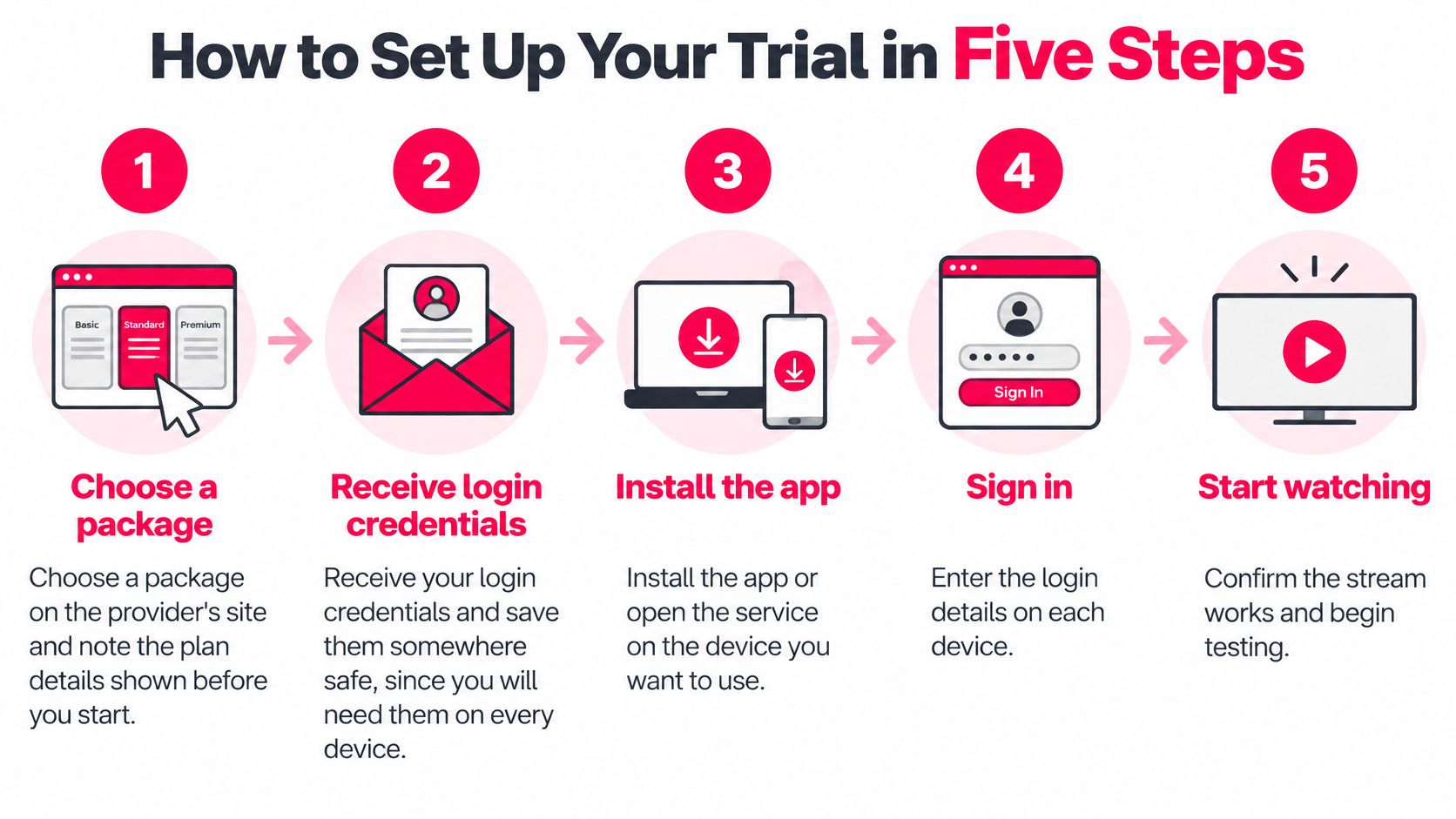
- Choose a package and note what the page says. Write down the plan name, the number of connections and the price as shown. If the confirmation differs later, you'll have a record of what you agreed to.
- Receive your credentials and store them properly. A note on your phone is fine; a screenshot you'll never find again isn't. These details are device-linked, so every screen in the house needs them.
- Install a supported player app on your first device. Follow the provider's installation guide rather than guessing from a forum post. Our IPTV setup instructions cover the common devices and the exact fields each app asks for.
- Enter the activation information exactly as sent. The most common slip on day one is a mistyped username or a password pasted with a trailing space, and it blocks the whole household, not just one screen.
- Start a live channel, then check the guide and one on-demand title. A channel that loads confirms the login works; a guide that populates confirms the data behind it does too; one film confirms the library is reachable.
Success looks specific: a live channel plays, the guide fills with correct programme names, and switching channels takes no more than a few seconds. If the guide stays blank while channels play, you're usually looking at an app or format issue rather than a dead service.
If you'd rather watch the sequence run on screen before you start, this walkthrough covers the same install and activation steps.
Bandwidth Each Stream Needs at Home
Can one 4K stream and two HD screens share the same evening connection, or does the picture stall once everyone is home? A 4K listing describes the source file; your house has to carry it. The 24-hour trial is the night you measure that load, with the household online as usual, before any paid plan starts.
CIRA's Canada-specific guidance puts a per-stream figure on the connection itself: approximately 5 Mbps download for SD video, 10 Mbps for HD and 30 Mbps for 4K, with about 2 Mbps upload listed in each case, according to the Canadian Internet Registration Authority's speed guide.
Downstream and upload speed needed by household stream mix
| Stream mix | Downstream needed | Upload needed | Notes |
|---|---|---|---|
| One SD stream | about 5 Mbps | about 2 Mbps | Suitable for a secondary room with a small screen |
| One HD stream | about 10 Mbps | about 2 Mbps | Typical single-television household |
| Two HD streams | about 20 Mbps | about 4 Mbps | Two screens watched at the same time |
| One 4K plus two HD streams | about 50 Mbps | about 6 Mbps | Test during evening peak and allow extra headroom |
Calculating Your Household Mix
Those figures are the floor. Background traffic, Wi-Fi overhead, and bitrate shifts sit on top of them. When a stream senses congestion, it lowers the picture or pauses while it waits for more data.
A home on a 50 Mbps plan can still stumble through a 4K plus two HD mix at eight in the evening. The router is also handling phones, a laptop update, and whatever the smart speaker is doing. The plan speed works like a pipe rated for a certain flow. A speed test is the flow that reaches the television during supper, after the rest of the house has taken its share.
Compare the table with the speed you measure during the trial, not the speed on the bill. Run a speed test on the same device, over the same Wi-Fi, at the hour you would normally watch, and write that number beside the matching row. Leave a margin above the row. A result that only just clears the floor leaves no room for a second device to join.
The rows are typical capacity for each mix. One evening reading cannot prove every channel, a quieter morning, or a wired TV in another room that you have not measured yet.
If your mix sits close to the limit, use the trial to find the ceiling. Drop to one 4K stream and see whether the second HD screen stays smooth. If it does, you have a practical household limit without paying to learn it. Our guide to IPTV internet speed requirements shows how to repeat the same measurement on each screen in the house.
How to Test Buffering Within 24 Hours
A speed test at noon can look fine and still stall at 8 p.m. Latency decides whether playback holds when the house is busy, and most speed tests never measure it. Throughput is the pipe width people already check. Latency is the pause before the next piece of video arrives, the way water hesitates when someone else starts the shower.
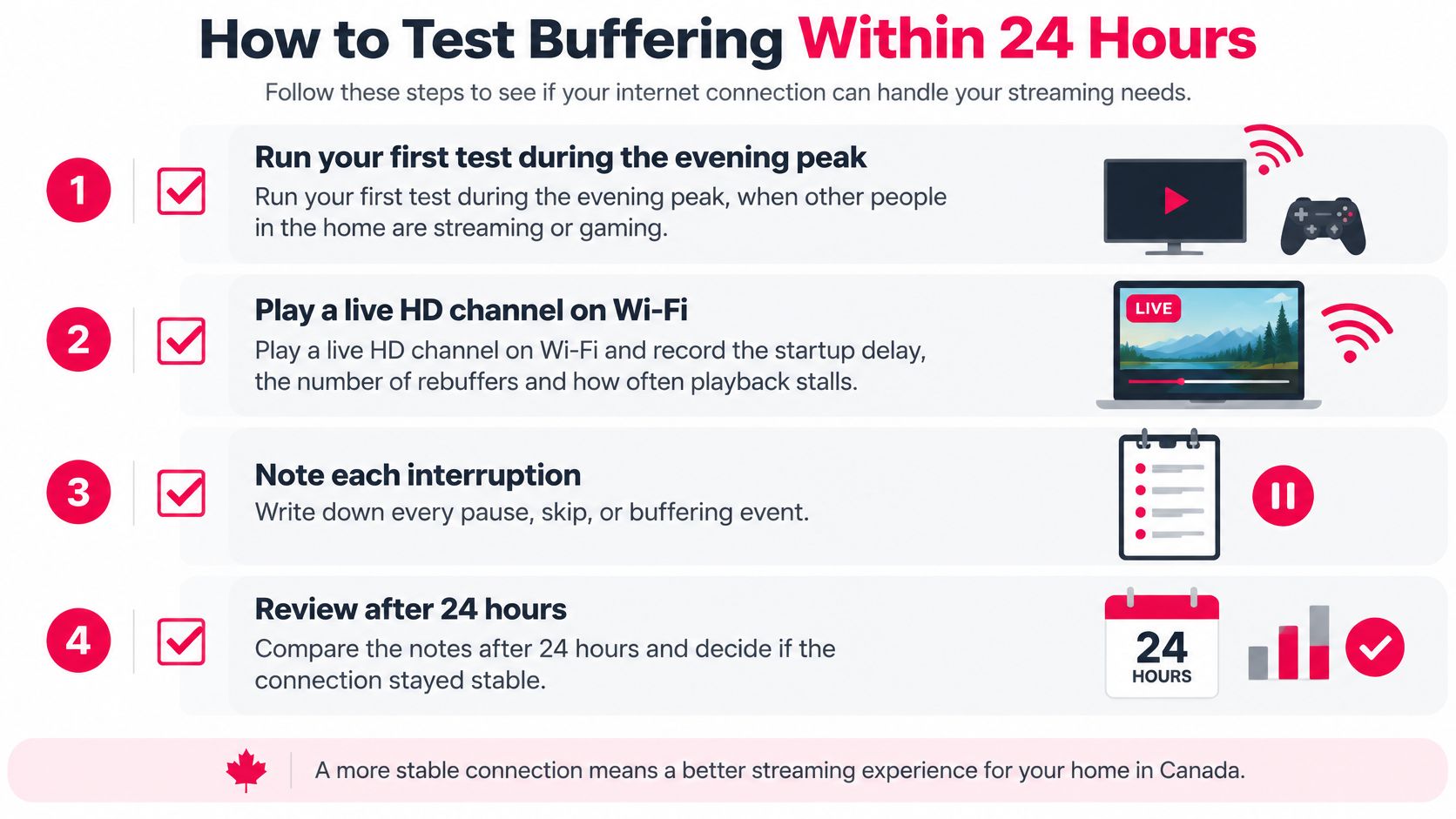
Use the trial as one repeatable evening test under real household load. Same hour, same devices, same pass rules. Write the results down so you can run it again if the picture changes later.
- Run the first test during the evening peak. Pick a weeknight between seven and ten, with the household doing what it normally does. Pass: the channel starts and holds for fifteen minutes without a stall.
- Play a live HD channel on Wi-Fi and time the startup. Count the seconds until the picture settles, then count each re-buffer. Pass: one clean start and no interruptions in those fifteen minutes.
- Repeat over Ethernet on the same device. If the wired run is clean and Wi-Fi is not, the limit is inside the house: distance, walls, an old router, or a crowded wireless channel.
- Saturate the connection. Start a large download on another device and watch the picture. Pass: quality steps down from 4K to HD or SD and keeps playing, rather than freezing on a spinner.
- Add a second simultaneous stream if your plan allows it. Pass: both screens stay watchable at the same time. That is the result a family lives with.
- Write down any failure. Timestamp, channel name, wired or wireless, and what else was running. Support needs that record to look at routing, server load, or stream origin.
Latency is the cross-check. In the CRTC's fixed-wireless performance study, average idle latency on Canadian fixed-wireless connections was about 37 to 39 ms, heavy download activity pushed peak-hour latency to around 174 ms, and the regulator notes that 35 to 42 ms or lower is generally desirable for video streaming, with problems becoming more noticeable above 100 ms.
If idle playback is stable but load breaks it, the bottleneck is in your house, not the server. Switching providers will not fix a congested Wi-Fi channel.
One evening cannot prove a Saturday playoff or a week of bad weather. It can show whether this house, at this peak, holds a stream under the load you create. If failures persist on both wired and wireless tests while other services stay responsive, send the timestamps to support. That is a provider-side question, and the trial window is the right time to ask it.
Channels and Sports to Check First
A family in Ottawa with three habits, the six o'clock national news, a Saturday hockey game and a children's channel before bed, has a three-item test rather than a scrolling contest. Check those three at the hours they normally air. Everything else is decoration.
The time is there to fill. Adults in Canada averaged 16.8 hours per week viewing digital video, according to the CBC/Radio-Canada 2024 environmental scan, which also found one-fifth of Canadian internet users reported watching free ad-supported streaming television channels in spring 2024. A lineup that misses those hours is a lineup that misses the point, no matter how many entries it holds.
Keep the observation to three things you can see:
- Which channels load, and how quickly. A channel that takes ten seconds to open will annoy you every time you flip during a game.
- Which ones fail. Note names, not general impressions. "The regional sports feed" is a report; "it was glitchy" isn't.
- Whether the guide matches the broadcast. Programme names and times should line up with what's playing, including on regional and language channels.
For a sports fan, the test is one live match, start to finish, on the specific feed you'd normally watch. A stream that behaves on a quiet Tuesday afternoon tells you nothing about a playoff evening when thousands of other viewers are on the same path. Watch a full period, not ninety seconds, and check whether the picture holds through half-time when everyone in the country opens the same app.
Language and international channels deserve the same treatment. If Arabic, Punjabi, Tamil or French programming is the reason you're looking, open those channels specifically rather than assuming the category label delivers them.
Decide Whether to Start Your Free Trial
Your notes now point one of three ways.
Start the trial, then move to a plan if every device you intend to use passed its check and your measured evening speeds cleared the bandwidth your household needs. That is the straightforward case, and the trial has done its job.
Hold off if a wired connection produced repeated rebuffering at peak while other services stayed fine. A bigger internet plan on your end will not necessarily fix that, because the bottleneck sits with the provider. Raise it with customer support before you pay, while you still have timestamps and channel names to point to.
Compare plan tiers if the test revealed a household need your first choice cannot meet. Two people watching different programmes at once is the most common gap, and multi-connection subscriptions exist for exactly that situation. If your testing points to a longer commitment, 12 Months IPTV Subscription Canada covers a full year of viewing with quality options up to 4K and 8K, thousands of live channels, and an on-demand library of movies and series. A two-device annual plan suits a household where two screens run at once. For a wider view of what separates one provider from another, the guide to choosing a TV provider in Canada sets out the features worth weighing.
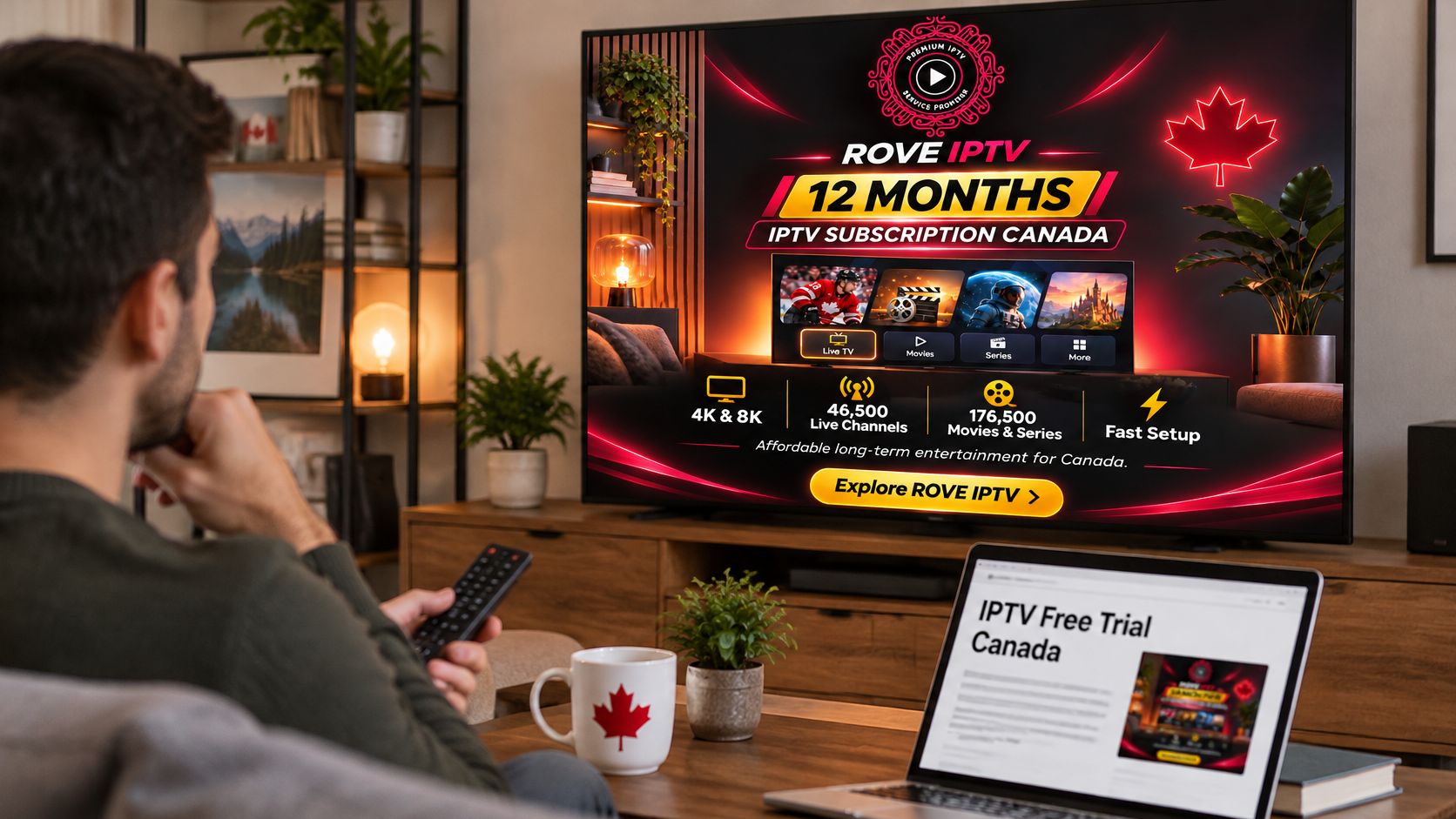
Confirm the current trial length, card requirements, refund terms and renewal details on the trial page before you commit, since promotions change. Subscriptions are priced in Canadian dollars with taxes included, and the site states that contracts and automatic payments are not required, so the commitment is easy to read before you enter it. Then keep your notes for the first week of paid service, so a recurring problem gets reported with evidence instead of a vague description.
Rove IPTV offers a 24-hour free trial with no credit card needed, so you can run the device, bandwidth and buffering checks above on your own connection before spending anything. Subscriptions come with a 7-day money-back guarantee, which covers what a single evening cannot reveal, such as how the service holds up across a full week of viewing. Visit Rove IPTV to request the trial and see the current plan options.

No Responses