

Two households in Brampton, a few minutes apart, search for the same 2016 film on the same evening. One finds it included in a subscription. The second finds it behind a rental price. A third viewer in Montreal types the same title and finds nothing at all. Nothing has malfunctioned, and nobody has been singled out by the app.
The gap between a service advertising a title and a viewer reaching it tonight, in the right language, on the right screen, is where most frustration starts. Video on demand movies rest on three moving parts: a catalogue that changes, a delivery network that has to keep up, and a set of licences that decide where and for how long a film can appear.
Learning to read those three parts takes about ten minutes and saves a lot of subscription money. It also explains why the same movie can be free on one service, a rental on another and missing entirely in your province.
Table of Contents
- How Video on Demand Movies Work
- Subscription, Rental and Free Options Compared
- How to Browse a Movie Library and Start Playback
- Playback Quality and Bandwidth Needs at Home
- Why a Movie Disappears or Costs Extra
- Languages, Subtitles and Audio Description to Check
- Troubleshooting a Movie That Will Not Play
- Choose Your Movie Setup Before You Subscribe
How Video on Demand Movies Work
Video on demand movies are films you pick and start whenever you want, sent over your internet connection instead of broadcast at a scheduled hour. The film waits on a server, your player asks for it in short segments, and the picture quality adjusts as your connection speeds up or slows down.
A library feels like one thing because three parts sit hidden behind a single menu.
The catalogue is the list of titles the service holds at that moment, usually organised by country, language, genre, release year and popularity. Delivery is the plumbing: the player fetches a few seconds of video at a time, buffers ahead, and steps down a quality level when segments arrive late. The licence is the studio's permission for that provider to show that film, in that country, for a set period.
A video store makes the shape clearer. The shelf is the catalogue. The counter is how you pay, whether that's a monthly fee, a rental or an ad break. And the studio's right to pull its own film back off the shelf is the licence.
Money moves through this market. Statistics Canada reported that in 2023, Canada's film and video distribution industry generated $1.7 billion in operating revenue, up $156.5 million, or 10.4%, from 2021, in its release on the distribution industry.
Three questions for any library: What does it hold tonight, how is each title paid for, and how long does that title stay?
Those questions get very different answers from a monthly subscription, a one-off rental and a service funded by advertising.
Subscription, Rental and Free Options Compared
The same film can be included in one service, priced as a rental on a second, and missing from a third entirely. The payment model is a large part of why, because it shapes how deep the catalogue runs, how often titles turn over, and how many screens can watch at once. The practical differences between the streaming services available in Canada usually come down to which model each one runs.
| Model | How it is paid for | What you get | Main trade-off |
|---|---|---|---|
| Subscription video on demand | Monthly or annual fee | Access to the catalogue while the account is active | Titles can leave the catalogue when licences end |
| Transactional video on demand | Pay per rental or purchase | Time-limited or permanent access to one title | Costs add up quickly if you watch often |
| Ad-supported video on demand | Free, funded by advertising | Free access to a smaller library | Ads and a narrower selection |
| Library bundled with a live TV plan | Included in the plan price | Films shown alongside live channels | Selection and device limits depend on plan terms |
Subscription video on demand charges a monthly or annual fee and opens the whole library while the account is active. It rewards steady viewing, because the cost per finished film falls with every title you watch. The trade-off is that the fee buys access that lasts only as long as the licences do, so the library shifts under you as titles leave. A film that was included in March can move behind a rental price in May, and the service owes you no warning when it does.
Transactional video on demand sells one title at a time, as a rental that lasts a set window or a purchase you keep. It suits a specific target: a new release, a school project, a title a child has asked for three nights running.
Ad-supported video on demand charges nothing and runs ads between scenes. The library is usually smaller and leans on older licensed titles, which works well when you're browsing rather than hunting for one film.
A film library bundled with a live TV plan arrives inside a subscription you already pay for. The movies come with the plan, and the selection, picture quality and device limit follow the plan terms rather than a separate film catalogue.
On-demand viewing was a serious revenue line long before the streaming era. Statistics Canada reported that video-on-demand services made up 22.4% of the film and video distribution industry's revenue in 2019 and were the only major revenue stream to grow between 2017 and 2019, adding 2.1%, in its 2019 release on the industry.
Rule of thumb: run the arithmetic on your own habits. Count the films your household finished last month, multiply by the rental price your service displays, and compare that total with the monthly fee.
A monthly plan such as 1 Month IPTV Subscription Canada pairs live channels with an on-demand library of movies and series, with thousands of live channel options alongside. The films stream on Smart TVs, Firestick, Apple TV, Roku and similar devices, so the model you choose matters as much as the screen you watch it on.
How to Browse a Movie Library and Start Playback
Start broad, then narrow. Typing a half-remembered title into the search bar is the slowest route through a library, while browsing by genre, country or language shows you what kind of catalogue you're paying for in the first minute.
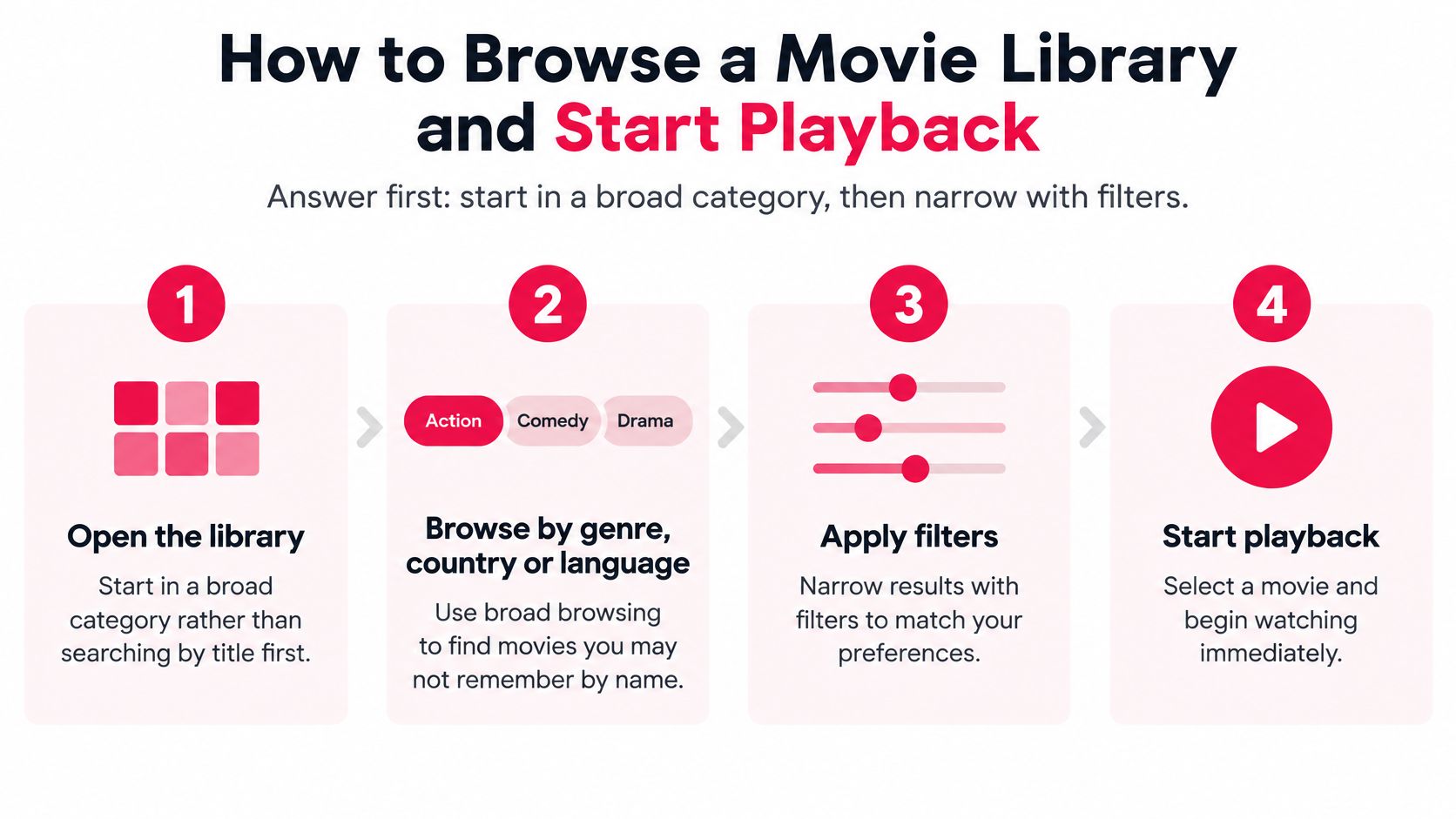
- Open the library and pick a broad category. Choose a genre, a country or a language rather than a title. One screen shows you the depth of the catalogue, which matters most during a trial.
- Apply filters to narrow the list. Release year, language and popularity cut thousands of titles down to something browsable. If a filter for Canadian French, Arabic or another language exists, note where it sits, because that's the control you'll use most.
- Open the title page for the details that shape the evening. Running time, the resolutions on offer and the audio tracks listed there tell you what you're committing to before the household settles in, so a two-and-a-half-hour epic doesn't catch you at 10 p.m.
- Set a quality level that suits your connection. Start at HD and let playback settle, then test 4K on its own rather than across three screens at once.
- Watch the first minute closely. Picture and sound either arrive cleanly or they don't, and a wrong audio track is easy to fix at minute one.
- Use resume and recheck the listing later. Resume saves your place between sessions. Catalogues shift as licensing deals change, so a film playing tonight can move to a different service or drop out entirely, which is why the same title turns up on one platform and not another.
Choice is the bigger problem for most viewers. A 2026 Rogers–Angus Reid survey reported that Canadians spend about 14 minutes choosing something to watch on average, 86% said there are too many streaming services to track, and 82% wanted one place to find available movies and shows regardless of provider, as reported in coverage of the streaming survey. Search and filter tools therefore matter as much as raw library size.
Run three checks in the first session: search for a film by its original title rather than its translated one, filter the library by the language your household speaks, and play one short film end to end. Those three checks tell you more than a catalogue count.
Playback Quality and Bandwidth Needs at Home
A film's picture quality depends on both the stream and the connection carrying it. The speed your provider advertises is a peak, while playback needs enough bandwidth to keep receiving video as the film runs. Other devices share that connection, too.
| Resolution | Sustained download speed | Data per hour | Practical note |
|---|---|---|---|
| SD (360p or 480p) | 3–4 Mbps | Netflix's measured range began at 0.35 GB per hour, according to CRTC measurements of fixed-broadband video services | Lowest data use, suits small screens |
| HD | 3–8 Mbps | Netflix averaged 2.86 GB per hour in the same CRTC measurements | A practical default for many screens |
| Full HD (1080p) | 5–8 Mbps | Netflix's measured range reached 7.92 GB per hour, according to the same CRTC measurements | Needs steadier throughput than HD |
| 4K Ultra HD | 25 Mbps; Netflix's stated minimum is 15 Mbps | Up to 5 GB per hour, according to CRTC connectivity reporting | Leave headroom when other devices are online |
The CRTC's Communications Research Centre lists roughly 3–4 Mbps for 360p and 480p, 3–8 Mbps for HD, 5–8 Mbps for Full HD and 25 Mbps for 4K Ultra HD. Netflix's stated 4K minimum is 15 Mbps, according to the CRTC's connectivity reporting.
From Advertised Speed to Sustained Throughput
A streaming player downloads video in segments and adjusts picture quality as conditions change. Your connection may test well at one moment, then slow when several people are online or evening traffic increases.
Leave some capacity for video calls, browsing and other streams. Two 4K films running at once require roughly twice the throughput of one, so a connection that handles one stream may struggle with two.
Data limits matter as well. At 5 GB per hour, a two-hour 4K film could use around 10 GB before overhead. In CRTC measurements, Netflix averaged 2.86 GB per hour, with a range from 0.35 GB to 7.92 GB; CraveTV averaged 2.20 GB, Global TV 1.22 GB and CBC TV 0.89 GB, according to the CRTC's 2019 fixed-broadband measurements.
- Set HD as your default. On a 55-inch screen at normal viewing distance, HD can provide a clear picture while using less data than higher resolutions.
- Check the data allowance on your internet plan. A long film in 4K can use substantially more data than the same film streamed in HD.
- Check your connection's needs before choosing a streaming setup. The guide to IPTV internet speed requirements explains how bandwidth affects playback.
Why a Movie Disappears or Costs Extra
When a film vanishes from a library, the licence usually ran out. Streaming rights work like a lease: the provider holds the movie for a set period, and when the term ends the title goes back. The same logic explains most other surprises, since you were never buying the movie, only the right to watch it under someone else's terms.
| Factor | Why it changes what you see | What to check |
|---|---|---|
| Licence window | Rights are granted for set periods | Look for expiry or removal notices where shown |
| Territory | Rights are often licensed by country or province | Confirm the title appears in your province, such as Quebec or Ontario |
| Rental or included | Some titles need a separate fee | Read the price label on the title page before pressing play |
| Device or app | A title can appear on one screen and be absent on another | Compare the listing across your devices |
| Language version | A film may have only one audio language | Note which audio and subtitle tracks the listing shows |
Territory catches people out because it feels arbitrary. A film visible to a viewer in Toronto may not appear for someone in Quebec when the rights were sold separately, and a provider's library can differ between markets for the same reason. The app is following its contracts, and the gap is real.
Say a viewer in Ottawa goes looking for a 2010s comedy. In one account it shows a rental price beside the title. In another account, run by a different provider, it doesn't appear at all. A third lists it in English only, with no French audio track.
When a title goes missing or costs more than expected, work in this order:
- Look for a leaving-soon or removal notice. Some services warn a few days ahead; others let the title drop without warning.
- Search by original title and release year. Re-releases and re-listings sometimes appear under a different entry.
- Reopen the app and sign out, then in. Stale sessions can hide titles that are available.
- Ask support whether the title is still offered in your region. Give them the title, device and time.
No library offers every film at every moment, and any service that promises that is overselling.
Languages, Subtitles and Audio Description to Check
Four features get used as if they're interchangeable, and they solve four different problems.
- Subtitles show dialogue as text and may leave out sound cues such as a door closing or a phone ringing.
- Captions, usually labelled SDH, include those sound cues and identify who is speaking.
- Dubbing replaces the dialogue with a voice cast in another language.
- Audio description narrates visual action for blind and low-vision viewers.
The labels overstate what's usable. Research on accessibility across video-on-demand and streaming platforms found roughly 80% of reviewed titles carried subtitles, but only 7.85% used SDH-specific subtitles and fewer than 3% offered Spanish audio description, according to the accessibility study on VOD and streaming platforms.
French-speaking households run into a related trap. The interface language is not the film's audio language, and a menu in French says nothing about whether the film has Canadian French dialogue or captions.
A Five-Point Check Before You Start
Work through the title page before committing to a feature film:
- Audio languages, including Canadian French.
- Subtitle and caption languages, listed separately from audio.
- SDH or closed captions, if anyone in the room needs sound cues.
- Audio description, if someone is blind or low vision.
- Whether the device keeps those tracks at 4K, since some apps drop them at higher quality.
Confirm the tracks on the title page and test a short scene before you settle in for two hours.
For households mixing languages, our guide to choosing captions for foreign-language films walks through the settings in more detail.
Troubleshooting a Movie That Will Not Play
A film that stalls twenty minutes in rarely says why. Work the way you would find one burnt-out bulb in a string of lights: change a single thing, test, then move on. Restarting everything at once tells you nothing, and no library can promise uninterrupted playback.
- Confirm the title appears in your province and on your device. A film can be licensed for one province or formatted for one device and not another, so availability comes before every other fix.
- Test a different title at similar quality. If the second film plays, the problem sits with the first title rather than your setup.
- Restart the app and check for updates. Outdated apps lose support for newer formats.
- Try the film on a second device. A title that fails on the television but plays on a phone points at the device or its app, not the service.
- Check the audio and subtitle tracks on the title page. Silence is often a selected track, not a broken file.
- Note the title, device, time and any error message before contacting support. Those details shorten the diagnosis.
A failure on one title but not others usually points to a licence, territory or device issue. Failures across every title point at the connection or the device itself, and the bandwidth guidance in the playback quality section explains how to check which.
Choose Your Movie Setup Before You Subscribe
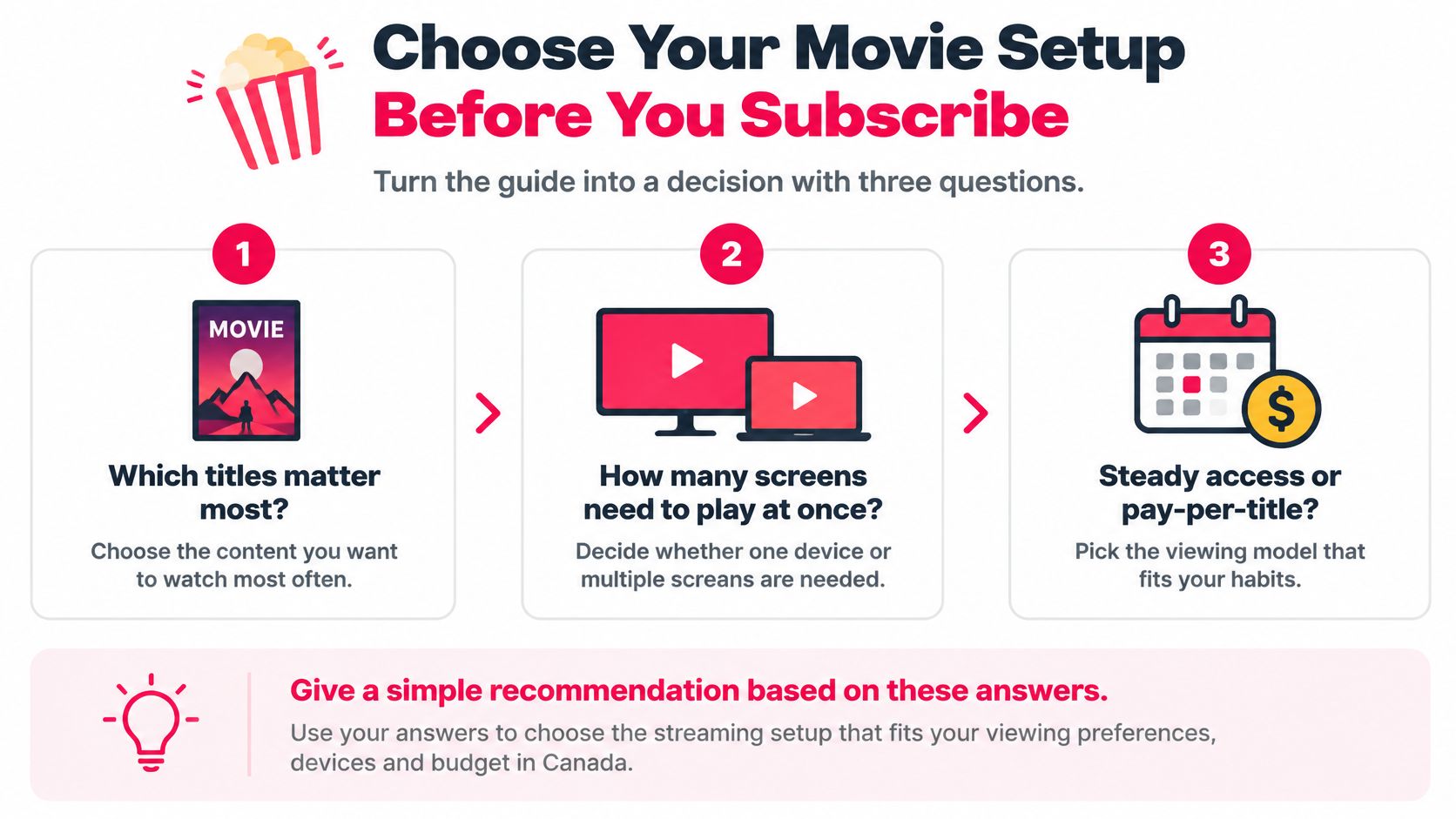
Before you pay, settle which titles your household wants, how many screens need to play at once, and whether steady access or per-title payment fits your viewing habits.
Movie libraries differ more than their advertised totals suggest. The same film can be included in one subscription, priced as a rental somewhere else, or missing in your province on your device, so a decision built on your own shortlist holds up better than one built on a catalogue size.
- Build the decision on your own shortlist. Pick five films your household wants and note whether each is included, rented or absent.
- Count the screens that run at once. Roommates and children rarely want the same film at the same time, so two viewers splitting up in the evening need two simultaneous sessions.
- Match the payment style to your habits. A subscription suits households that watch every week, while occasional movie nights can cost less paid per title.
- Test the browsing tools, not just the picture. Categories for country, language, genre, release year, popularity and recent additions decide whether finding a film is quick or becomes a chore.
Rove IPTV includes a VOD library with those browsing categories alongside live channels, sports and international programming, and a multi-device option such as 1 Month IPTV Subscription Canada – 2 Devices covers two separate sessions at once.
Run the checklist during a trial where one is offered, then compare plans with your shortlist in hand.
Rove IPTV puts an on-demand movie and series library next to live channels and sports in a single subscription, streaming in 8K, 4K, HD or SD and adapting to the connection in your home. The free trial gives you a day to test browsing, playback and caption tracks on your own television before any payment. Visit Rove IPTV to start a trial and compare the subscription options that fit your household.

No Responses